Every time you open a website, connect to a server via SSH, or launch a container in the cloud, the same process takes place behind the scenes, which involves searching for and using an IP address. We are so used to the internet that we rarely think about how a computer finds another computer among billions of devices on the network. Meanwhile, IP addresses are the basis of all network logic, without which there would be no websites, no servers, and no modern infrastructure. A few years ago, we wrote an article on the topic of “IP addresses are the cornerstone of the entire Internet.” In this article, we decided to refresh the information on this topic and try to delve a little deeper into the issue.
Understanding how IP addresses work will be useful not only for network engineers, but also for online project owners and ordinary users, not to mention developers and system administrators, who encounter them constantly, for example when renting a VPS for their online project, configuring a firewall, connecting a CDN, or diagnosing network problems on their home computer. In this article, we have tried to explain complex network mechanisms in simple terms. So, let's get started.
What is an IP address and why is it needed?
An IP address is a unique identifier for a device on a network. In essence, it is the “delivery address” for data packets transmitted over the network. If you imagine the internet as a huge city, then an IP address is a combination of a street and a house number, without which a letter simply will not reach its recipient.
When your browser requests a web page, it doesn't work with the domain names we're used to typing into the address bar (www.google.com or www.youtube.com) - it only works with numerical addresses. It's the IP address that tells the network where to send the request and where to expect a response. Without this mechanism, any connections would turn into chaotic noise.
The IP network protocol is not interested in the content of the data, because its task is simply to deliver the packet from point A to point B. However, packet integrity control, packet order, and request logic are handled at higher levels of the OSI model, such as TCP, UDP, HTTP, and other protocols.
In short, an IP address is only responsible for addressing and delivery. It does not know what exactly you are transferring - an HTML page, a video, or an API request.
The difference between IPv4 and IPv6
Today, in practice, the most commonly used addresses are IPv4 addresses, such as 192.168.1.10. They consist of four numbers (octets) from 0 to 255, separated by dots, and this format allows for about 4.3 billion unique combinations. However, contrary to the expectations of the protocol's creators, this proved to be insufficient for the growth of the rapidly developing Internet, so IPv4 addresses actually ran out back in 2018, and now obtaining IPv4 address blocks for companies and providers has become very difficult.
To keep the internet scaling, NAT technologies, so-called “gray networks,” and technologies that allow for the reuse of addresses appeared over time. This allowed the crisis to be postponed for a while, but made the network architecture much more complex.
The shortage of IPv4 addresses prompted engineers to develop a new address standard, IPv6, which, due to its characteristics, can provide a virtually unlimited number of addresses. And in 1995, the Internet Engineering Task Force (IETF) published its first specification, RFC 1883.
IPv6 looks unusual - long hexadecimal strings with colons, like this:
2001:0db8:85a3:0000:0000:8a2e:0370:7334
Moreover, there are several rules for simplifying the notation of empty (zero) blocks. Thus, by simplifying the above address, it can be rewritten as follows:
2001:0db8:85a3::8a2e:0370:7334 (0000:0000 omitted)
On the other hand, its address space is practically infinite, and thus IPv6 can assign a unique IP to each device, container, or service without any tricks.
Table - Key differences between IPv4 and IPv6
| Feature |
IPv4 |
IPv6 |
| Format |
Four numeric blocks |
Hexadecimal blocks |
| Number of addresses |
~4.3 billion |
Practically unlimited |
| NAT |
Required |
Not required |
| Auto-configuration |
Limited |
Built-in |
| Usage |
Widely used |
Actively adopted |
Today, most servers and devices on the Internet operate in hybrid mode, using IPv4 for compatibility and IPv6 as a backup for the future and as an added bonus for network stability.
Public and private IP addresses
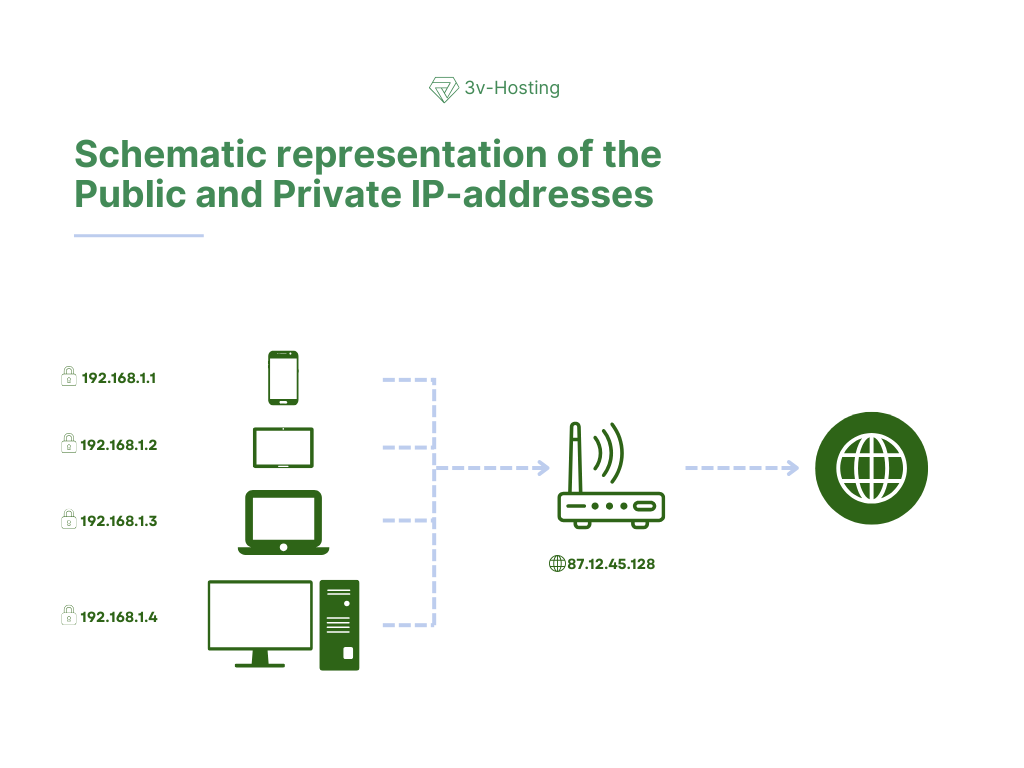
Not every IP address is accessible to the entire Internet. There are private ranges that are used within local and cloud networks. Such addresses are assigned to home computers, office devices, virtual machines, and containers.
A public IP is an address that is visible from the outside, from the Internet. A server with a website, mail gateway, or VPN node must have a public IP, otherwise it will be impossible to connect to them from the outside.
In modern infrastructures, a single public IP often hides dozens of internal services, i.e., one address is visible from the outside, while inside there is a complex scheme of subnets, load balancers, and routes.
How services find the right IP
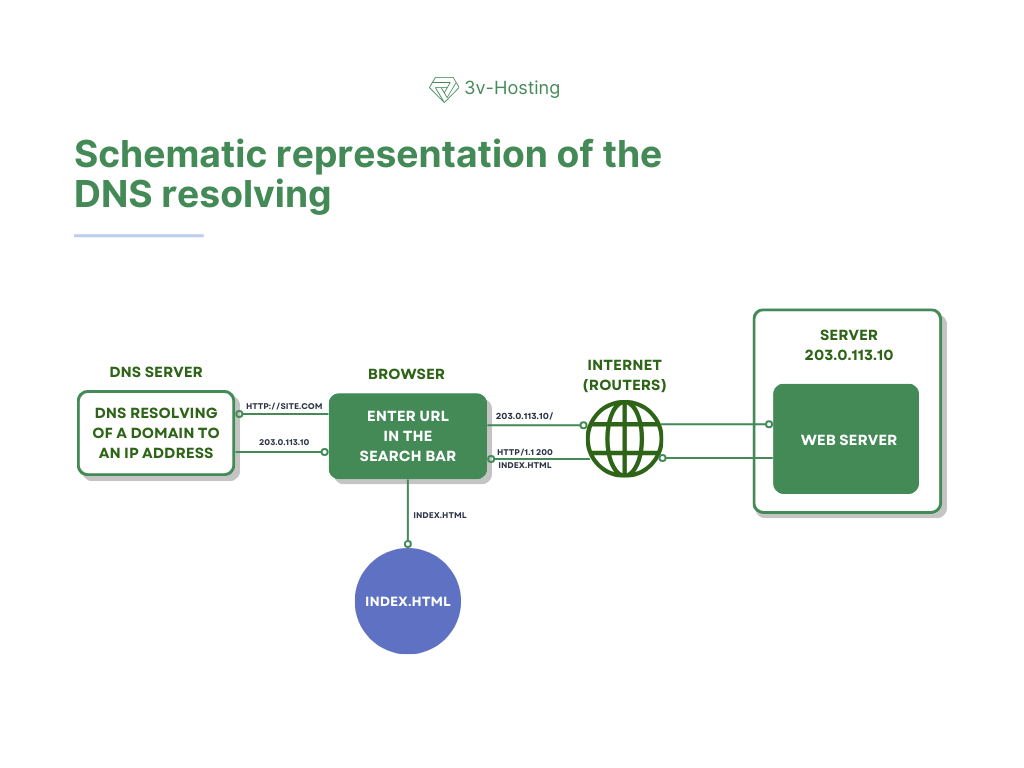
When you enter a website address in your browser, the first service to come into play is DNS, a kind of internet phone book. It takes the domain name you typed in the address bar and converts it into an IP address that network devices can understand. The browser does not “understand” words and letters - for it, only numerical addresses exist. Only after the DNS returns the IP address is it possible to establish a network connection and begin transferring data directly between your computer and the remote server.
Control then passes to the routers. Each router along the packet's path makes its own local decision about where to send the data next so that it gets closer to its destination. A packet can pass through dozens, and sometimes hundreds, of intermediate nodes, and yet no single device stores the entire route. Each element of the network is only responsible for the next step, relying on its own routing tables. It is this decentralized approach that makes the Internet resilient and allows data to find its way even when individual parts of the network fail.
The process of requesting a website in simplified form looks like this:
- The user enters the domain in the browser;
- The browser requests the IP address via DNS;
- The IP address received is used to establish a connection;
- Packets pass through a chain of routers to the remote node;
- The server sends a response back to your computer.
Below is a schematic representation of this process.
Static and dynamic IP addresses
An IP address can be permanent (static) or temporary (dynamic). Dynamic IP addresses are most often used by Internet service providers. In this case, the address is assigned to the device for a limited period of time, i.e., today the user has one IP, and after reconnecting or after a certain period of time, they will have another. For normal web surfing, viewing websites, working with email or messengers, such a change of address is practically invisible and has no effect on the user experience.
A static IP, on the other hand, is a fixed network address that does not change over time. It is permanently assigned to a device or server and remains unchanged even after reboots or connection failures. This type of IP is necessary for servers, APIs, VPN access, and any services where connection stability and network address predictability are critical. A static IP allows you to easily link domain names, configure SSL certificates, firewall rules, monitoring and automation systems without fear that a sudden change of address will disrupt the infrastructure.
IP address and security
The IP address is one of the basic elements of network security and the first level of traffic filtering. It is the IP address that is most often used to decide whether to allow or deny access to a service, record user activity, or activate protective mechanisms. At the server and network device level, the IP address is used as a simple and quick reference point for initial connection assessment.
In practice, IP filtering is used in a wide variety of scenarios. It is used to protect services from password guessing and automated attacks, restrict access to administrative interfaces and internal control panels, configure geographic blocking of traffic from certain regions, and impose limits on the number of requests to websites and APIs. Such measures reduce the load on the infrastructure and cut off obviously malicious traffic even before deeper verification.
At the same time, it is important to understand that an IP address alone is not a reliable way to identify a user. The same address can be used by a corporate network, dozens of ISP customers, a NAT device, or a proxy server. That is why modern security systems only use IP in combination with other data, such as access logs, authorization tokens, device fingerprints, and behavioral analysis. This approach allows for a balance between protection and convenience for legitimate users.
FAQ. Frequently asked questions about IP addresses
Is it possible to have multiple IP addresses on a single VPS?
Yes, most hosting providers allow you to assign multiple IP addresses to a single VPS. This is often used to host multiple websites, email services, test environments, or individual network services that require their own address.
What happens when the server's IP address changes?
When the IP address changes, you need to update the DNS records of your domains, recreate or rebind SSL certificates, and check external integrations and security rules. If you don't do this, your website or service may become temporarily unavailable.
Is a “bad” IP address dangerous?
An IP with a bad reputation can cause problems with sending emails, blocking by external services, and additional checks by search engines. Therefore, it is important to monitor the reputation of the IP in hosting and change it if necessary.
Is it possible to hide the real IP address of the server?
Yes, CDN, reverse proxy, or load balancers are often used for this purpose. In this case, external traffic sees the IP address of the proxy service, and the real address of the server remains hidden from direct access.
Which is better for a website: IPv4 or IPv6?
The optimal option is to use both protocols simultaneously. IPv4 provides maximum compatibility, while IPv6 increases network stability and the project's readiness for future Internet development.
Conclusions
An IP address is one of those elements of the Internet that is rarely thought about as long as everything is working. But as soon as the first network problem arises, it becomes clear how important it is. It is the foundation on which the entire Internet rests, from a simple website to a distributed infrastructure.
Understanding what IP addresses are and how they work helps you diagnose failures faster, speak the same language as your providers, and make more informed technical decisions. For IT professionals, this is basic literacy; for businesses, it is a way to reduce risks and better control their digital environment.
The Internet may seem abstract and “cloudy,” but ultimately it relies on specific technologies, and the IP address is the first brick in this structure.