Some people think that a proxy and a VPN are just two different words for the same thing. Both hide your real IP address, both help you bypass restrictions and all kinds of blocks, and both can be used for work and in everyday life.
But if you take a closer look, it becomes clear that these are tools on completely different levels, operating on different principles and suited for different tasks. One handles specific tasks and gives you control over your traffic, while the other completely reconfigures your entire network, adding a layer of security.
In this article, let’s try to get to the bottom of this issue: what exactly is a proxy, how does it differ from a VPN, and under what circumstances is it actually appropriate to use one tool or the other.
What Is a Proxy
So, to explain it as simply as possible, a proxy is a kind of intermediary between you and the internet. This means that you don’t connect directly to the desired website; instead, your request first goes to an intermediate server - the proxy itself - which then makes the request to the website on its own behalf. It is precisely because of this way of working that the word “proxy” has firmly entered everyday vocabulary and is used in contexts unrelated to IT and networks; for example, everyone has heard the phrase "proxy conflict" - an armed conflict involving the forces of other states instead of one’s own - or "proxy voting" - voting through representatives.
But let’s get back to IT. From the perspective of the website you’ve visited, it looks as though it’s not your computer that’s accessing it, but a proxy server. This is the core concept, which involves simply substituting the source of the request.
Here’s how it works:
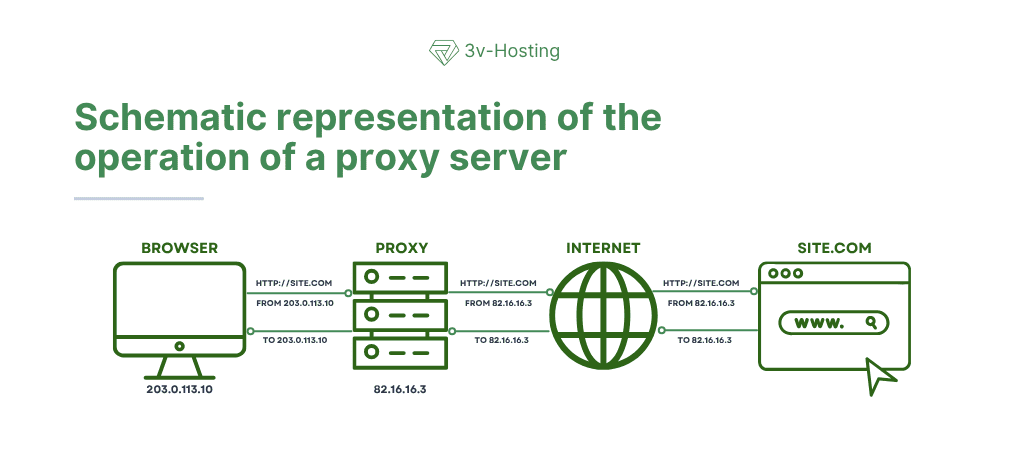
At the same time, a proxy can not only forward your requests but also filter, cache, or modify them, depending on your task.
Types of Proxies
When people say “proxy,” they often mean something abstract, but in practice, there are several different types of solutions that operate at different levels.
The most common type is the HTTP/HTTPS proxy. It works exclusively with web traffic, browsers, API requests, and websites - that is, at Layer 7 of the OSI model (L7). This is the simplest and most straightforward use case, as shown in the diagram above.
A more versatile option is the SOCKS proxy. This type of proxy is not tied to a specific protocol and can proxy virtually any traffic, from browsers to torrents and game clients.
There are also so-called transparent proxies, which are used by ISPs or corporate networks and can operate without explicit configuration on the user’s side.
When choosing a proxy type, you should base your decision on the task at hand, whether it’s, for example, simply hiding your IP, scraping websites, or load balancing.
Where proxies are actually used
And yet, despite the common belief that proxies are needed for security, this is not the case. Their main value lies in traffic management and configuration flexibility.
In practical applications, proxies are actively used where it is necessary to scale requests or work with different IP addresses. This could include website scraping, account management, geolocation testing, or bypassing simple restrictions.
In IT infrastructure, a proxy is generally one of the fundamental elements. It sits in front of applications, distributes traffic, caches responses, or acts as an entry point into the system.
To understand how this works in practice, just look at a classic example of a reverse proxy on Nginx. In this case, the proxy does not send the request out of the system; rather, it receives it and forwards it into the system.
server {
listen 80;
server_name example.com;
location / {
proxy_pass http://127.0.0.1:3000;
proxy_set_header Host $host;
proxy_set_header X-Real-IP $remote_addr;
}
}
This approach is used in almost every production project. All external traffic is handled by the proxy, while the application remains inside.
How a Proxy Differs from a VPN
We’ve written about VPNs many times before, so we won’t repeat ourselves here; instead, we’ll try to briefly explain the difference between a proxy and a VPN. The problem is that when you try to explain this difference in words, there’s always a sense of something left unsaid, a feeling that something is missing. But we’ll give it a try.
So, to put it simply, a proxy is like asking a courier to go to the store for you, while a VPN is like going to the store yourself, but in an armored car with the windows rolled up.
To help you understand the differences between these two technologies a bit more fully, we’ve put them into a simple comparison table. This table helps you quickly get the full picture in your head and see the key differences.
| Parameter |
Proxy |
VPN |
| Operating level |
Application level |
System-wide |
| Encryption |
Usually none |
Yes |
| Scope |
Specific applications |
All traffic |
| Speed |
Higher |
Lower (depends on configuration) |
| Setup |
Simple |
Requires configuration |
| Primary purpose |
Traffic management |
Security |
This quick comparison clearly shows that these tools are not competitors but are designed for fundamentally different tasks.
Is a Proxy Secure?
To reiterate, many people view a proxy as a security tool, but this is more of a side effect - and not even always.
If a standard HTTP proxy is used, data may be transmitted through it in plain text, which means it can be easily intercepted, since the proxy server itself sees all traffic. This is precisely why you should absolutely not trust any so-called “free” proxies or, for that matter, proxy servers set up by someone else for your purposes.
A VPN works completely differently. Its primary purpose is to secure the connection channel. It encrypts data, hides it from your ISP, and makes working on unsecure networks significantly safer.
But it’s important not to go to the other extreme, because a VPN doesn’t make the user anonymous by default. If you’re logged into an online service, it will recognize you regardless of whether you’re using a VPN or not.
Performance and Latency
From a performance standpoint, a proxy seems like a lighter tool, and that’s indeed the case. It doesn’t waste resources on encryption and doesn’t change the device’s network architecture.
A VPN, on the other hand, adds load, since all data must be encrypted, decrypted, and routed through an additional node.
However, in today’s environment, this is no longer as critical. For example, WireGuard itself demonstrates very high performance, and with a sufficiently good server, the user may not even notice the difference.
In addition to the choice of technology itself, the server location also plays a huge role, because the farther away it is, the higher the network latency will be. It is important to take this into account when choosing a VPS for a VPN or proxy, especially when it comes to real-time tasks.
When to Use a Proxy and When Not to
To reiterate, a proxy is best viewed not as a security tool, but as a working mechanism for traffic management. It solves practical tasks in areas where flexibility, scalability, and control over requests are important.
In practice, proxies are used when you need to process a large number of requests or work with different IP addresses. This could involve web scraping, automation, testing services from different regions, or load balancing within an infrastructure.
Simply put, a proxy is useful when you’re managing a flow of requests and want to influence how they appear to the outside world.
When a proxy is a bad choice
However, there are situations where using a proxy isn’t just useless - it can actually be dangerous. First and foremost, this applies to anything related to the security and privacy of the data being transmitted.
For example, if you’re working with sensitive information, connecting via public Wi-Fi networks, or accessing any administrative panels, the lack of encryption becomes a compelling reason to choose a different technology. In such conditions, a proxy doesn’t protect data; on the contrary, it can even become an additional point of risk.
In these scenarios, a proxy does not solve the problem, and it is better to replace its use with a VPN or other security tools.
Can a Proxy and a VPN Be Used Together
In practice, proxies and VPNs are quite often used in the same system; this is a perfectly normal architectural approach since these tools solve different tasks and ultimately complement each other well.
A VPN handles security, creates a secure channel, and provides access to a private network, while a proxy operates within that network and manages traffic. This separation of roles prevents mixing of layers: security remains at the network level, and traffic processing logic remains at the application level.
And if we put this all together, we get a typical production infrastructure diagram.
First, the user connects to the VPN and enters a closed loop. After that, their requests are processed by a proxy server (for example, Nginx or Traefik), which then directs traffic to the necessary services.
Using this architecture combines a number of advantages, such as secure system access, flexible traffic management, and scalability. This is precisely why it is widely used in modern projects, ranging from small services to large-scale microservice systems.
FAQ: Frequently Asked Questions About Proxies and VPNs
Does a proxy provide anonymity?
Not exactly. A proxy hides your real IP address, but it doesn’t make you completely anonymous. A website can still identify you through cookies, your account, your browser, or other metadata. It’s a tool for masking the source of a request, not for full anonymity.
Does a proxy encrypt traffic?
In most cases, no. A standard HTTP proxy transmits data in plain text. An HTTPS proxy can handle encrypted traffic, but the proxy itself remains a point that can potentially “see” your data.
If channel security is critical, you’ll need a VPN or other encryption methods.
Can a proxy be used for security?
To a limited extent. A proxy can hide your IP address or restrict access, but it does not secure the connection on its own. Therefore, using it as your sole security tool is a bad idea, especially when working with sensitive data.
Does a proxy slow down the internet?
Sometimes yes, but not always. It all depends on the quality of the proxy server and its location.
If the server is fast and located nearby, you might not even notice a difference. If the server is overloaded or located far away, the delays can be noticeable.
How does an HTTP proxy differ from a SOCKS proxy?
An HTTP proxy works only with web traffic (browsers, APIs), while a SOCKS proxy is a universal proxy that can proxy virtually any type of connection.
Can a proxy be used together with a VPN?
Yes, this is standard architectural practice. In this case, the VPN handles encryption and channel security, while the proxy manages traffic within the network.
This combination is often used in infrastructure and provides greater control.
Conclusion
Proxies and VPNs are often lumped together, but in practice, they are tools of different levels that solve different problems.
A proxy allows you to handle requests flexibly, spoof IP addresses, distribute load, and scale processes. It is a practical tool for development, automation, and infrastructure. Meanwhile, a VPN encrypts the connection, protects data, and creates a private communication channel.
It is important to understand the essence of both tools and not to try to use one tool in place of the other. A proxy does not replace a VPN when it comes to security, and a VPN is not suitable for tasks where scale and control over requests are important. Therefore, in real-world projects, they most often work in tandem, and it is precisely this approach that yields the best result - a secure yet flexible infrastructure.